FMEA with AI
Speed up FMEA with AI and safeguard quality
The AI can be used in two targeted cases, when creating a new FMEA and when updating an existing one. It works with your FMEA tool, and your team makes the decisions.
Live in under six weeks
Transcript (English translation)
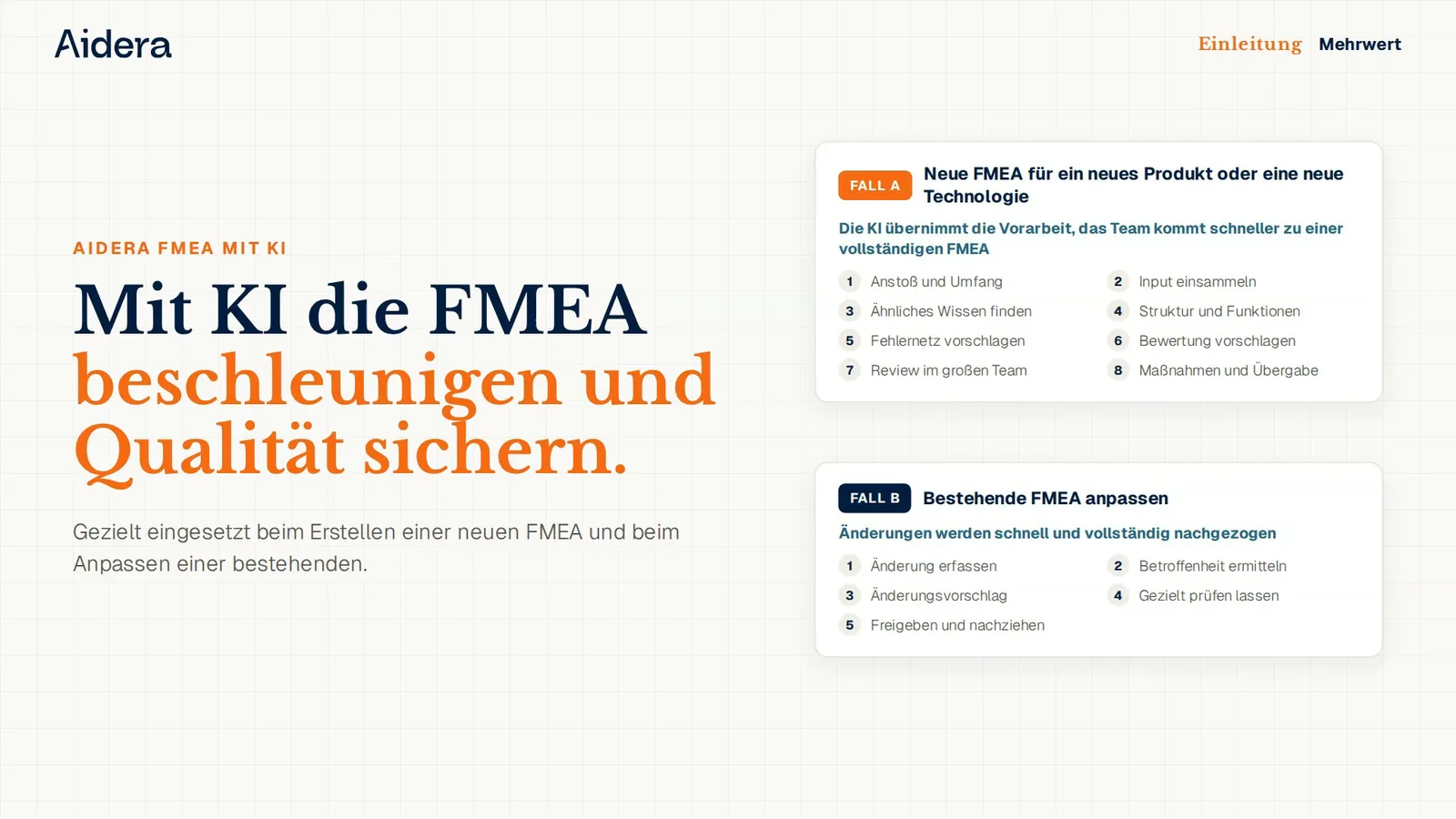
The AI can be used for FMEA in two targeted cases, when creating a new FMEA and when updating an existing one, to speed up the work and ensure quality. Let's get started. In the first case, a new FMEA is created, and the AI does the groundwork so the team reaches a complete result faster. When the project reaches a milestone, the AI clarifies in the chat what is new and what remains existing technology, and proposes the core team to match the discipline. It then requests input from the departments with a deadline and checks whether everything is complete. From old FMEAs, foundation FMEAs, lessons learned and 8D reports, it retrieves comparable knowledge, which is thus also available to inexperienced teams. From this, it builds the structure tree with process steps and 4M, proposes functions and asks where information is missing. For every function, it proposes failure effects, failure modes and causes with their source, so every proposal remains traceable. For severity, occurrence and detection, it proposes values with justification and calculates the action priority, and the team makes the decision. In the review, it assigns review tasks by expertise and presents interfaces to both disciplines, so the final meeting only clarifies open points. Finally, it derives the test planning, transfers the FMEA to your FMEA tool and marks special characteristics for the control plan and DFMEA. In the second case, an existing FMEA is updated, and the AI makes sure changes are carried over quickly and completely. If the trigger is a closed 8D report, the AI reads the confirmed root cause from D4 and the actions from D5 to D7. It then checks what is affected, down to linked and similar FMEAs, and clarifies whether the cause was rated incorrectly or was missing entirely. The change proposal only affects the specific places, for example a higher occurrence rating and new actions from the 8D, and everything else remains unchanged. Only the experts whose area is affected need to review, and often an approval without a meeting is enough. After approval, the FMEA is versioned with a reference to the 8D report, the AI shows the follow-up documents to update, and D7 can be closed.
Case A
Create a new FMEA
The AI does the groundwork so your team gets to a complete FMEA faster.
Trigger and scope
When the project reaches a milestone, the AI clarifies in the chat what is new and what remains existing technology. It proposes the core team to match the discipline.
Collect input
It requests input from the departments with a deadline and checks whether everything is complete.
Find experience
It retrieves comparable knowledge from old FMEAs, foundation FMEAs, lessons learned and 8D reports.
Structure and functions
It builds the structure tree with process steps and 4M, proposes functions and asks where information is missing.
Failure network
For every function, it proposes failure effects, failure modes and causes with their source.
Rating
For severity, occurrence and detection, it proposes values with justification and calculates the action priority according to AIAG-VDA.
Review
It assigns review tasks by expertise and presents interfaces to both disciplines. The final meeting only clarifies open points.
Handover
It derives the test planning, transfers the FMEA to your FMEA tool and marks special characteristics for the control plan and DFMEA.
Case B
Update an existing FMEA
The AI makes sure changes are carried over quickly and completely.
Evaluate the trigger
For a closed 8D report, the AI reads the confirmed root cause from D4 and the actions from D5 to D7.
Determine what is affected
It checks linked and similar FMEAs and clarifies whether the cause was rated incorrectly or was missing entirely.
Targeted change proposal
The proposal only affects the specific places, for example a higher occurrence rating and new actions. Everything else remains unchanged.
Targeted review
Only the experts whose area is affected need to review, and often an approval without a meeting is enough.
Approve and follow up
The FMEA is versioned with a reference to the 8D report, the AI shows the follow-up documents to update, and D7 can be closed.
Live in under six weeks
Your result
Faster to a complete FMEA
The AI does the groundwork, and the final meeting only clarifies open points.
Experience from the start
Previous FMEAs, lessons learned and 8D reports flow into every new FMEA with their source.
FMEAs stay current
Changes from 8D reports reach all affected FMEAs quickly and completely.
Fits into your system landscape
The AI works with your existing systems such as ERP, CAQ, FMEA tool, Outlook and file storage. Our engineers adapt every solution to your processes. Security is ensured by ISO 27001, a dedicated instance per customer and hosting in Germany.
Frequently asked questions about FMEA with AI
What is an FMEA?
Failure Mode and Effects Analysis, FMEA for short, systematically assesses which failures can occur in design or process, what effects they have and how they are prevented or detected. A distinction is made between design FMEA (DFMEA) and process FMEA (PFMEA), in the automotive industry according to the AIAG-VDA FMEA handbook.
Does the AI replace our FMEA tool?
No. The AI works with your existing FMEA tool and transfers the finished FMEA to it.
How does the AI rate severity, occurrence and detection?
It proposes values with justification for every cause and calculates the action priority according to AIAG-VDA. Your team makes the decision.
Where does the experience come from?
From your previous FMEAs, foundation FMEAs, lessons learned and 8D reports. Every proposal shows its source so your team can trace it.
How are the 8D report and the FMEA connected?
Confirmed root causes and actions from an 8D report belong in the FMEA. The AI reads them, checks all affected FMEAs and proposes only the necessary changes.
What does FMEA with AI cost?
FMEA with AI is priced individually and based on ROI. The main price factors are the number and scope of your FMEAs and the connection to your FMEA tool.
How long does it take to roll out FMEA with AI?
FMEA with AI is live in production in less than six weeks, and then the trial phase begins. Before that, our engineers connect your FMEA tool and make your previous FMEAs, lessons learned and 8D reports available to the AI.
How does FMEA with AI differ from an FMEA template or conventional FMEA software?
FMEA with AI is tailored to your processes and fully integrated into your existing FMEA tool. A template or conventional FMEA software provides the structure, and your team works out the content alone. The AI contributes the experience from your previous FMEAs, lessons learned and 8D reports.
How secure is our FMEA knowledge with Aidera?
Your FMEA knowledge is protected to the highest data protection standards, and Aidera is ISO 27001 and TISAX certified. Every customer gets a dedicated instance hosted in Germany.
More quality solutions
Let's look at your next FMEA together
We show you both cases using an example from your production.
Live in under six weeks